
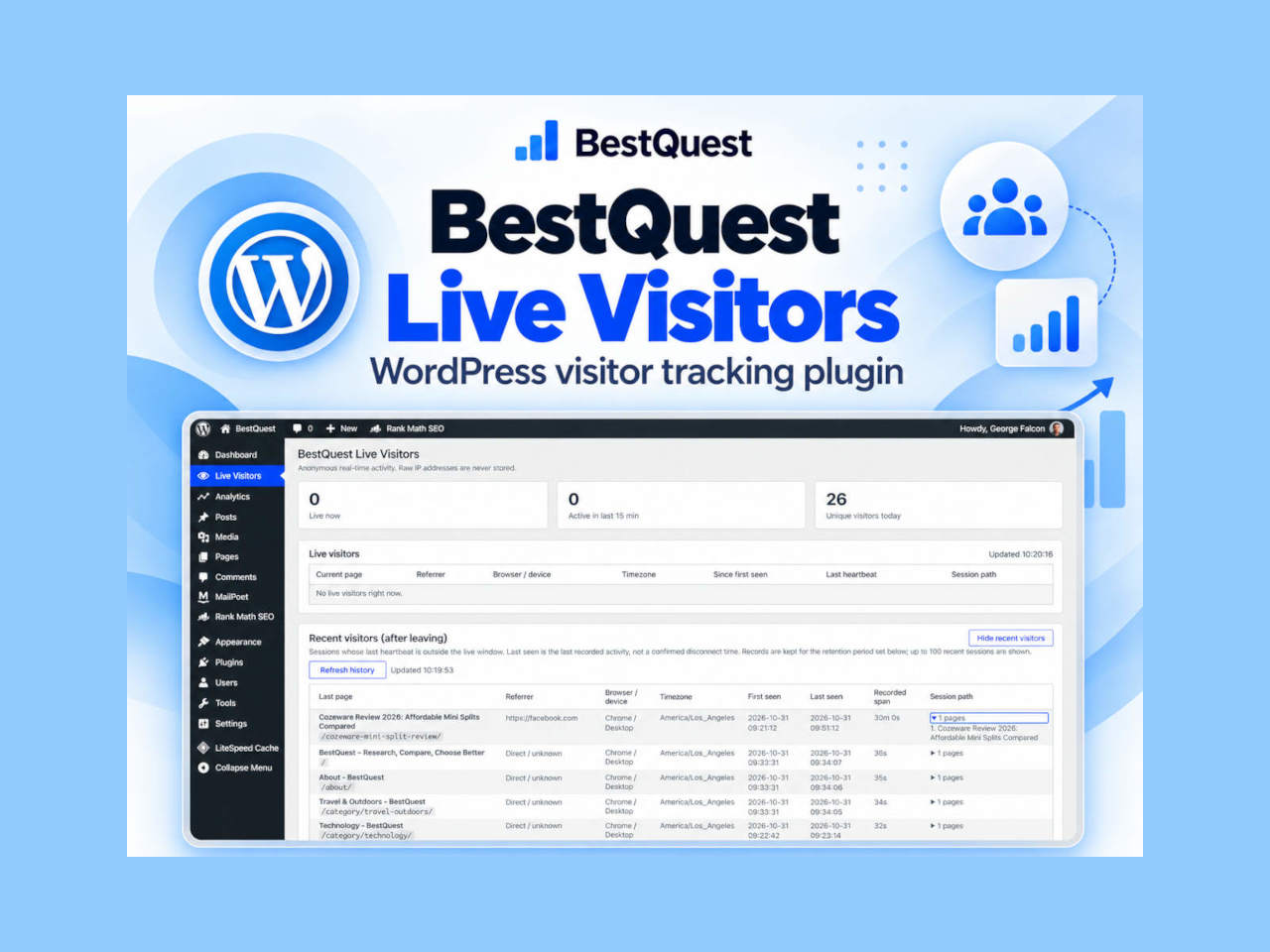
Want to know who’s browsing your WordPress website right now, where they came from, and which pages they’re visiting? We developed a free, open-source plugin that puts this information directly in your WordPress dashboard—without requiring an external analytics account.
Most website owners already have some form of analytics installed. Google Analytics, for example, can tell you how many people visited yesterday, where they came from, and which pages attracted attention.
But sometimes you want something simpler.
You open your WordPress dashboard and wonder: Is anyone looking at the website right now? Did that visitor from Facebook read another article? Which page did they visit last?
That’s why we developed BestQuest Live Visitors, a lightweight WordPress plugin designed to answer these questions.
The plugin is now publicly available on GitHub, and we’re inviting WordPress users to try it, report problems, and suggest improvements.
See What’s Happening on Your Website Right Now
BestQuest Live Visitors adds a dedicated Live Visitors page to the WordPress administration dashboard.
At the top are three straightforward statistics:
- Live now: The number of visitors detected within the configured live activity window.
- Active in the last 15 minutes: Visitors whose activity was recorded recently.
- Unique visitors today: An approximate count of distinct visitors recorded during the day.
Below these figures, a table displays current visitor sessions.
You can see which page someone is viewing, the website they arrived from when that information is available, their browser and device type, their reported timezone, and the pages they’ve visited during the session.
For example, you might see a visitor arriving from Google, reading a product review, and then moving to another article.
You don’t need to wait for tomorrow’s analytics report to discover that activity.
See What Visitors Did After They Left
One of the most useful features is Recent Visitors.
Initially, our plugin displayed only currently active visitors. Once someone stopped visiting the site, their entry disappeared.
We quickly realized that this wasn’t very helpful if the website owner wasn’t watching the dashboard at exactly the right moment.
So we added session history.
With a single click, you can review previous sessions, including:
- The last page visited.
- The referring website, if available.
- Browser and device information.
- First and last recorded activity.
- The approximate time between those events.
- The sequence of pages visited.
The plugin doesn’t know exactly when someone closes their browser. A session becomes inactive when its last recorded activity falls outside the configured live window.
You can choose how many days previous session records are retained.
No External Analytics Service Required
BestQuest Live Visitors operates within your existing WordPress installation.
There is no separate analytics account, external dashboard, or subscription fee.
Visitor information is stored in your website’s own WordPress database.
The plugin does not store raw visitor IP addresses. It uses browser identifiers to estimate unique visitors and sessions, and allows administrators to exclude their own IP address from tracking.
Browser identifiers and session information can still qualify as personal data under applicable privacy laws. Website owners should review the plugin’s privacy documentation and ensure their use of the plugin meets relevant consent and disclosure requirements.
Simple Controls, Useful Information
We deliberately avoided making the interface complicated.
You don’t need to configure conversion funnels or learn a reporting system just to see whether someone is browsing your site.
Open Live Visitors, and the information is there.
The settings let you adjust the heartbeat interval, the period during which a visitor is considered live, and how long session records are retained.
We’ve also improved browser detection during testing, including recognizing Chrome on iPhone separately from Safari.
BestQuest Live Visitors is not intended to replace a comprehensive analytics platform. Its purpose is to provide a convenient view of live and recent activity.
Free and Open Source — Download from GitHub
BestQuest Live Visitors is distributed under the GPL-2.0-or-later license. The source code is publicly available for inspection, modification, and contributions.
Current GitHub release: v1.3.4 (prerelease)
Download BestQuest Live Visitors v1.3.4 from GitHub
To install it:
- Open the GitHub release page and download the installable plugin ZIP from the Assets section.
- In WordPress, go to Plugins → Add New Plugin → Upload Plugin.
- Select the ZIP, install it, and activate the plugin.
- Open Live Visitors from the WordPress administration menu.
The plugin was developed and tested on BestQuest, but wider WordPress compatibility and security testing are still in progress. We recommend making a backup and testing it on a staging website before installing it on a production site.
A Note About the BestQuest Credit
The GitHub edition includes a small public footer credit:
Visitor insights powered by BestQuest
This links to BestQuest.net and helps other website owners discover the project.
The credit is enabled by default but can be switched off in Live Visitors → Settings. It makes no additional tracking requests to BestQuest.
We believe in explaining this clearly so website owners know exactly what the plugin adds to their websites.
Help Us Improve BestQuest Live Visitors
We’re releasing the plugin publicly because feedback from real WordPress users can help us discover issues that don’t appear in our own testing environment.
We’d particularly welcome feedback on compatibility with different themes, hosting providers, caching systems, and WordPress configurations.
We’re also interested in suggestions for future features.
Would daily summaries be useful? More detailed referral information? Better automated-traffic filtering? Session export?
Rather than add features nobody needs, we’d prefer to hear what website owners actually find useful.
If you encounter a bug or have an improvement to suggest, please use the project’s GitHub Issues page:
Report a bug or suggest a feature
Please avoid including personal visitor information, credentials, or other sensitive data in public reports.
A Small Project With Room to Grow
BestQuest normally publishes independent research, reviews, comparisons, and practical guides to help readers make informed decisions.
But occasionally, our own work leads us to develop something useful.
BestQuest Live Visitors started as a simple way to observe activity on our website. It has since evolved to include session history, page journeys, browser detection, and configurable tracking settings.
Now we’re making it available to the WordPress community.
It’s free, open source, and still evolving.
If you run a WordPress website and would like a simple way to monitor live and recent visitor activity, we’d be interested to hear about your experience.
Explore BestQuest Live Visitors on GitHub
BestQuest Live Visitors is an independent BestQuest project. It is currently distributed through GitHub and is not listed in the official WordPress Plugin Directory.