

A 2TB portable SSD for £16 sounds like a bargain, and a 4TB one for even less sounds better still. Then you read the reviews and find buyers saying the drive held 8GB, or 26GB, or 58GB, and that the family videos they saved are gone.
I went through the one-star reviews on a handful of very cheap AliExpress drives, and the stories were more alarming than ordinary bad electronics. These drives don’t just fail. They look like they’re working, and that’s what makes them dangerous.
The files were there. Then they weren’t.
Take this AliExpress portable SSD listing. I checked it on 27 October 2026. It looks like hundreds of other cheap drives, with several capacity options and more than 2,200 reviews, plenty of them five stars.
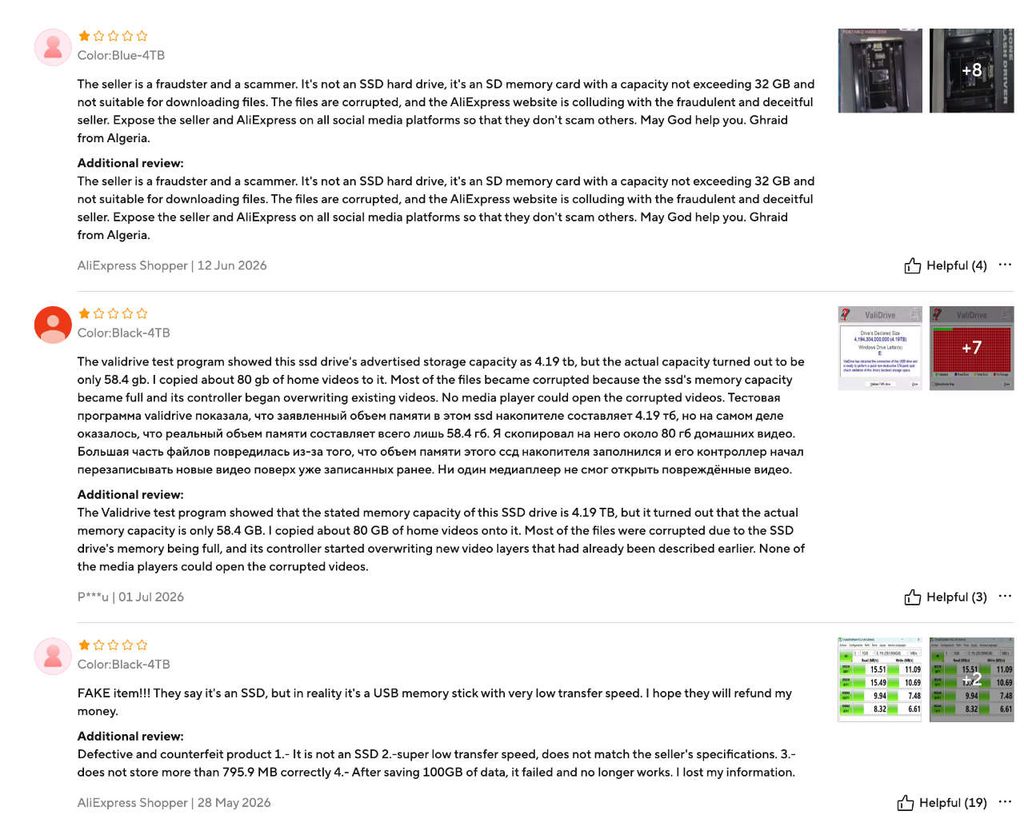
The negative reviews tell a different story, and several come with screenshots:
- 1 July 2026, 4TB version: the buyer ran ValiDrive, a free tool for exposing fake capacity. The drive declared about 4.19TB, but the test found only 58.4GB. They had already copied roughly 80GB of family videos onto it. Most of those files ended up corrupted and wouldn’t open in any media player.
- 28 May 2026, 4TB version: another buyer says the drive couldn’t hold more than about 800MB correctly, and stopped working altogether after they saved 100GB. They say they lost their data. In their benchmark screenshot the speeds look like roughly 15MB/s reading and 11MB/s writing, as far as I can read it. That’s memory-card speed, not SSD speed.
- June 2026, 4TB version: a reviewer says it’s actually an SD card holding no more than 32GB, with corrupted files, and posted photos of the inside.
- 13 September 2026, 1TB version: the buyer says the real capacity was 26GB.
- 7 September 2026, 2TB version: a buyer reports 8GB, with photos attached, and says the drive caused errors on their PC.
A second listing, this one, has a fresh run of complaints from 22 to 27 October 2026:
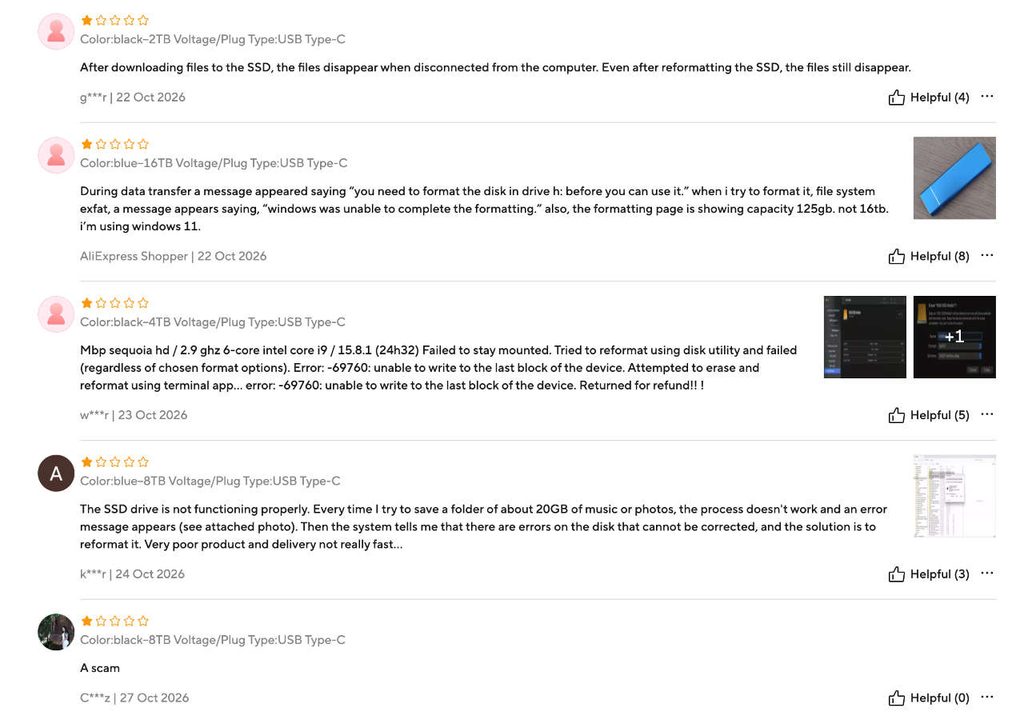
- One buyer says files disappear when the drive is unplugged, even after reformatting.
- A “16TB” buyer says Windows asked them to format it, failed, and showed a capacity of 125GB.
- A Mac user got the error “unable to write to the last block of the device”, couldn’t reformat it, and returned it for a refund.
- An “8TB” buyer says saving about 20GB of music and photos throws errors, and the system then says the disk is damaged.
Two caveats. These are individual customer reports, not our own lab measurements. And I read the one-star reviews on purpose, so what I’ve described isn’t the full picture of what buyers think.
A couple of years ago, I bought a suspiciously cheap “1TB” portable drive out of sheer curiosity. I wanted to see what was actually inside. When I opened it, I found an ordinary USB flash drive with a capacity of just around 60MB.
But the reports line up with a well-documented kind of storage fraud. The damage goes beyond the money. Picture copying your family photos to a new drive, seeing the folders appear in Finder or Explorer, and deleting the originals to free up space. Six months later you go to open them, and they aren’t there.
How does a 32GB card pass as a 2TB SSD?
The principle is simple. When your computer asks a USB drive how big it is, the controller inside answers, and a dishonest manufacturer can make it say anything. Windows or macOS then shows 2TB or 4TB even though the hardware holds a small amount of flash.
UK data-recovery firm Dataquest opened up a “4TB SSD” in 2025. Inside was an unbranded 58GB SD card hot-glued to a USB adapter board, plus car-wheel balancing weights stuck in the case to make it feel like a real drive. Dataquest explains that the first 50GB or so usually looks fine. As you approach the real limit, new data is simply discarded, and that tends to corrupt the earlier files too. Your computer may keep saying “copied successfully” the whole time. By the time you notice, you may have deleted the originals. Read Dataquest’s write-up.
It’s an old trick. In 2023, YouTuber der8auer ordered a set of drives from AliExpress, including “Seagate” externals claiming 64TB and 128TB. They contained a small board with a 64GB microSD card glued into the socket. Tom’s Hardware reported on his findings. The listings we looked at are different products, but it’s the same idea.
The listings that started this
These are the products that prompted the investigation. Only the first two come with real buyer evidence.
| AliExpress listing | What raised concerns |
|---|---|
| 1005011719500562 | Multiple buyer reports of missing capacity (8GB, 26GB, 58.4GB), corrupted files and drives that stopped working |
| 1005013234604843 | Recent reports (22–27 Oct 2026) of vanishing files, failed formatting, a “16TB” drive showing 125GB, and a macOS write error |
| 1005013322799157 | Conflicting SSD and mechanical hard-drive descriptions |
| 1005012566878523 | An implausibly cheap high-capacity drive |
| 1005013272421373 | Very low advertised price despite apparently reassuring feedback |
The first two are backed by the customer accounts above. We haven’t physically tested any of the five, and the last two are flagged on price alone. A suspicious price isn’t proof of fraud, but it’s a reason to be careful.
An SSD that spins at 5400 RPM?
One listing describes its product as an SSD and also gives a hard-drive rotation speed of 5400 RPM. Those two things can’t both be true. An SSD stores data in flash chips and has nothing spinning inside. Only a traditional hard disk has platters, usually turning at 5400 or 7200 RPM.
It could be a sloppy template, a copy-paste error or deliberate misdirection. In any case it’s a good reason to ask the seller questions, or to buy somewhere else.
Why five-star reviews don’t settle it
This is the part that catches people out, because some of these drives do have a lot of positive reviews.
A five-star rating doesn’t prove the capacity is real. A buyer plugs the drive in, sees “4TB” in Windows, copies a few holiday photos and leaves a glowing review. Nothing in that process tests whether the drive can hold 4TB. They might not find out until weeks later, after saving far more.
Reviews that praise fast delivery, nice packaging or the fact that “my computer recognised it immediately” tell you almost nothing. Even a good-looking CrystalDiskMark screenshot doesn’t prove all the advertised gigabytes are there, because the small test file can sit entirely inside the real part of a fake drive.
The reviews worth trusting come from people who filled the drive and read the data back.
One buyer says AliExpress refused a refund
The problem isn’t limited to these listings. In a March 2026 Reddit post, a buyer said they bought several supposed 2TB, 4TB, 16TB and 64TB portable SSDs from AliExpress, and that each one had a far smaller real capacity. They say they tested the drives with H2testw and ordinary file copies, sent technical evidence to AliExpress, and saw the disputes closed without refunds. Read the post on Reddit.
That’s one person’s account, and we haven’t seen their dispute records. Still, it shows why relying on a marketplace refund is risky when the thing you’re protecting is irreplaceable. A refund can’t bring back photos that were overwritten.
How to test a drive
You don’t need to open the case. You need to write data to the drive and read it back.
1. ValiDrive (Windows), the quick check. ValiDrive from Gibson Research was built to catch USB drives that lie about their size. Instead of trusting the number the drive reports, it writes and reads data at hundreds of locations across the claimed space. If a “2TB” drive can’t reliably store anything past a small chunk, the results show it. It’s a good first screening, though sampling isn’t the same as checking every location.
2. H2testw (Windows), the thorough check. This one fills the drive with test data and then reads it all back. A drive that claims 2TB but holds 32GB can’t pass. The downside is time: a genuine 2TB drive can take hours. For a drive you’re about to trust with irreplaceable files, that’s time well spent.
3. F3 (macOS and Linux). The open-source F3 – Fight Flash Fraud uses f3write and f3read to write test files and verify them. It works on macOS (the docs cover installing it with Homebrew). On a Mac, its documentation suggests unplugging and reconnecting the drive between writing and reading. A full run can take a long time, especially on a spinning disk.
Do this on an empty drive. A fraudulent device can overwrite existing files during testing, and some low-level test options are deliberately destructive. Never test a drive that already holds the only copy of anything.
What does a real 2TB drive cost?
A spinning hard drive is slower than an SSD, but it gives you genuine terabytes for less money, which suits a family archive. We checked manufacturer specifications for these three .
Toshiba Canvio Basics 2TB, the budget pick
A mechanical portable hard drive with USB 3.2 Gen 1 and no separate power supply. The 2TB model weighs about 149g. It comes formatted for Windows, so Mac users will need to reformat it. It’s not fast, but it’s an established product with published specs and a model number you can look up. Indicative UK price: From £103.19
Seagate Expansion Portable 2TB, the plain alternative
Another mechanical portable drive with USB 3.0. You plug it in, copy your files and that’s it. Compared with an SSD it’s slower, and it’s more sensitive to knocks while it’s running. Checked UK retailer price: £131.59
Kingston XS1000 2TB, the real SSD
If you want an actual SSD, this is smaller and lighter than a portable hard drive and much faster over USB 3.2 Gen 2. Kingston rates its reads at up to 1,050MB/s. That makes it handy if you move photos and video between computers a lot. It costs more than the AliExpress bargains, but the comparison is unfair, since those drives may not hold anything like their advertised capacity. Indicative UK price: £373.19
What I’d buy for a family archive
For plain storage, I’d get a genuine hard drive from a reputable brand and shop. The Toshiba Canvio Basics is a sensible budget choice and the Seagate Expansion is a similar alternative. If the drive is going to travel, be plugged in and out daily, or be used for active photo and video work, I’d pay more for the Kingston.
Buying a drive and protecting an archive aren’t the same thing, though. Genuine drives fail too. Connectors break and files get deleted by accident. So I’d never keep the only copy of a family archive on one external drive. Aim for three copies, on two kinds of storage, with one stored somewhere other than your home. Nobody can recreate a 1975 family photo, and a spare drive costs very little compared with losing it.
Already bought one of these?
Stop saving to it right away. Copy off anything you can still read, and open a dispute with the marketplace while the protection window is open. If you paid by credit card or PayPal, ask about a chargeback or a Section 75 claim. Keep your test screenshots, since they’re your evidence.
Six checks before you buy any drive
- The manufacturer. Prefer an established brand with a real model number and published specs.
- The price. A “new 2TB SSD” for £10 or £15 deserves instant suspicion.
- The technology. If it says SSD but mentions spindle speed, something’s wrong with the listing.
- The reviews. Look for people who tested the full capacity and for long-term reports, not delivery comments or photos of the box.
- The seller. An official store or established retailer beats an anonymous seller promising 16TB.
- The actual capacity. Test the drive before you trust it, wherever you bought it.
The real cost of a fake SSD
A drive that won’t connect is annoying, but you know it’s dead. A fake-capacity drive is worse because it looks fine, accepts your files and shows your folders, right up to the day you need what’s inside.
So don’t trust the number printed on the case, or the one your computer shows. Write enough data to fill the drive, read it back, and if the files can’t be replaced, keep another copy.