
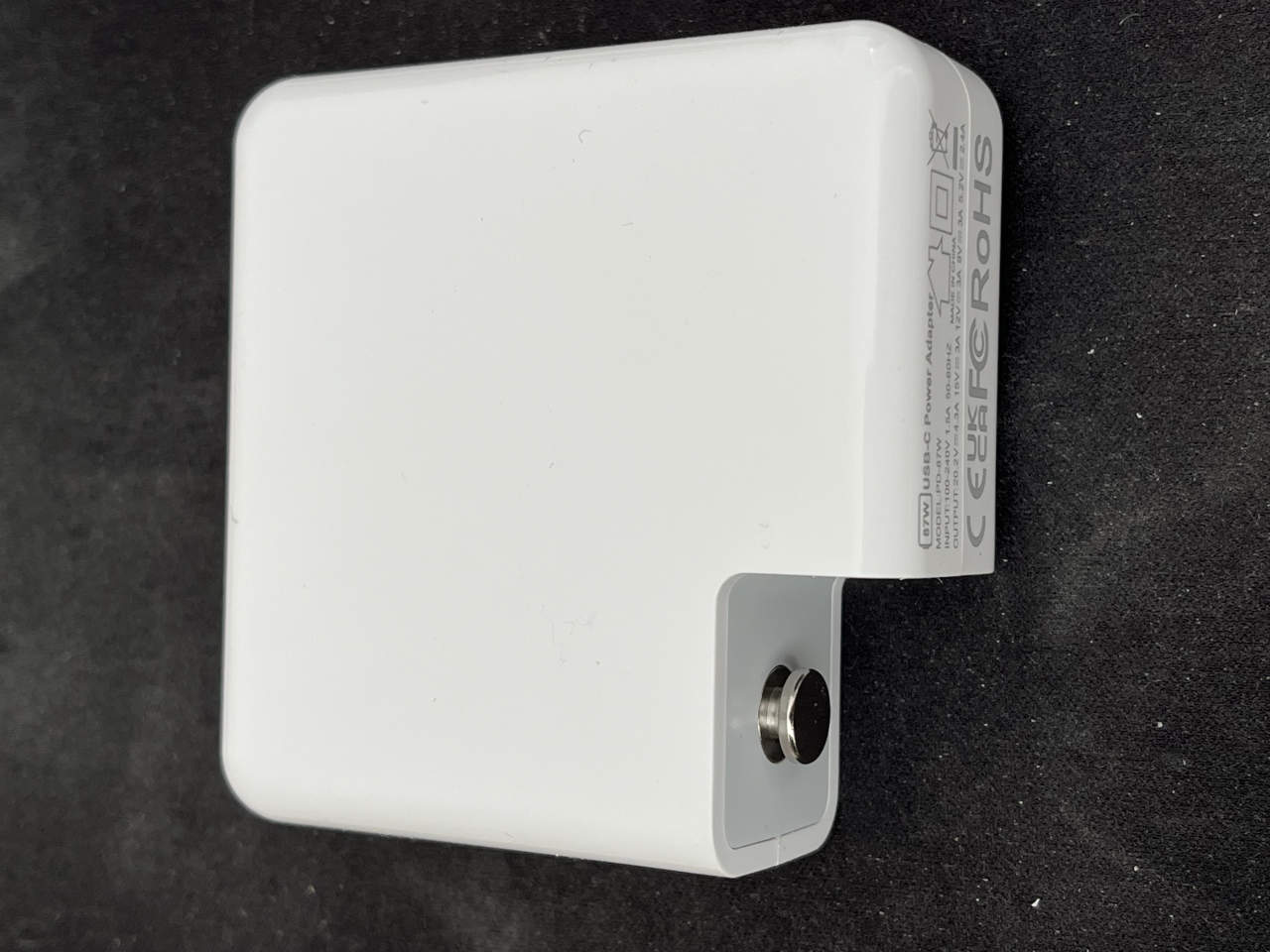
A charger is one of those things most of us stop thinking about as soon as the laptop starts charging.
This one made me think about it.
It arrived with a used MacBook Pro I ordered through Walmart. The white case looked convincingly familiar, the label claimed 87 watts, and the USB-C output specifications looked perfectly respectable.
Then the MacBook began intermittently behaving as though the charger had simply been unplugged.
No warning. No dramatic failure. The power adapter would just disappear from the laptop and then return.
So I opened it.
What I found was more interesting than I expected. This is not one of those crude two-dollar power supplies with crooked components and barely enough circuitry to work. The PCB is fairly sophisticated, the soldering is good, and the power architecture looks like a serious attempt at a high-output USB-C supply.
The surprise came when I pointed a thermal camera at it.
At only around 50–58 watts of real load — well below the claimed 87-watt maximum — several parts of the board were already running above 60°C, with the hottest point I recorded reaching 73.6°C while the enclosure was open.
The electronics are not the main problem here.
The missing thermal hardware is.
What the label claims
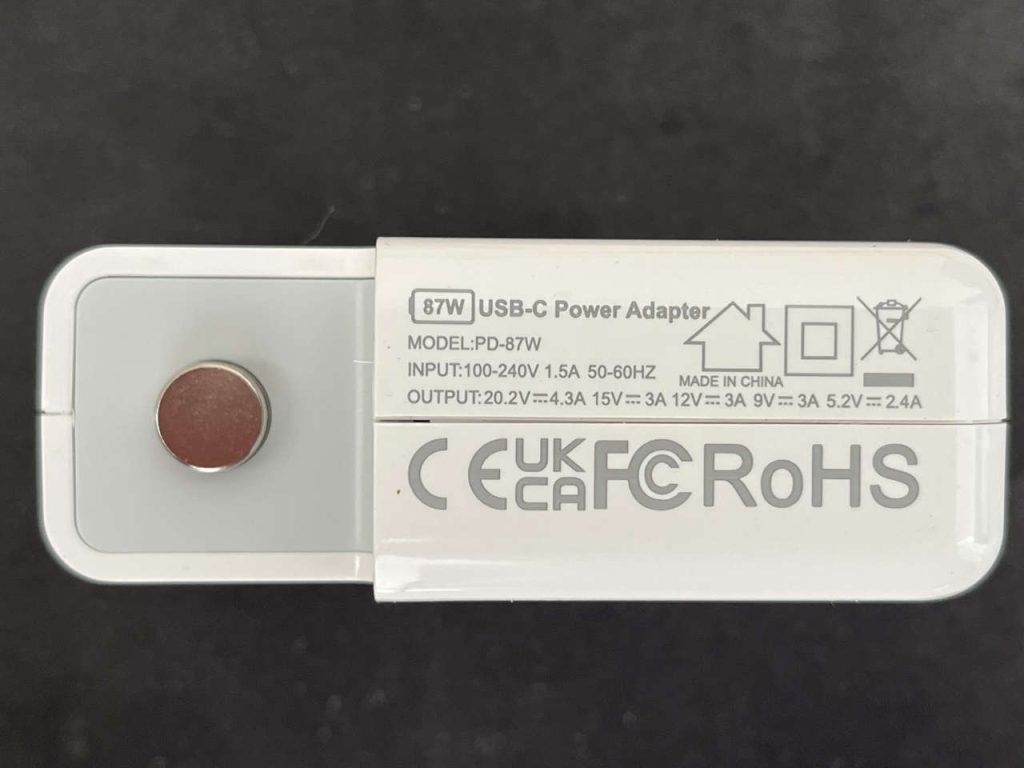
The adapter identifies itself simply as:
87W USB-C Power Adapter
Model: PD-87W
The label specifies a 100–240 V, 50–60 Hz input and these output modes:
20.2 V at 4.3 A, 15 V at 3 A, 12 V at 3 A, 9 V at 3 A and 5.2 V at 2.4 A.
The top mode works out to roughly 86.9 watts, so the 87W rating at least makes mathematical sense.
It also carries CE, UKCA, FCC and RoHS markings, although there is no recognizable consumer brand or manufacturer name printed on the housing.
The model number turned out to be revealing.
I found a Chinese OEM listing for a PD-87W MacBook replacement adapter from a Guangdong supplier. It is advertised for wholesale at $14.20 each for orders of 50 or more, with the same basic 20.2 V / 4.3 A headline specification.
Another retailer sells a charger under the exact PD-87W designation and currently shows no customer reviews at all.
I could not find a credible independent review tied conclusively to this exact no-name unit.
That is worth noting because “PD-87W” appears to function more like a generic trade-model designation than a uniquely traceable retail product. Different listings using that name even show slightly different voltage profiles.
The PCB was better than I expected
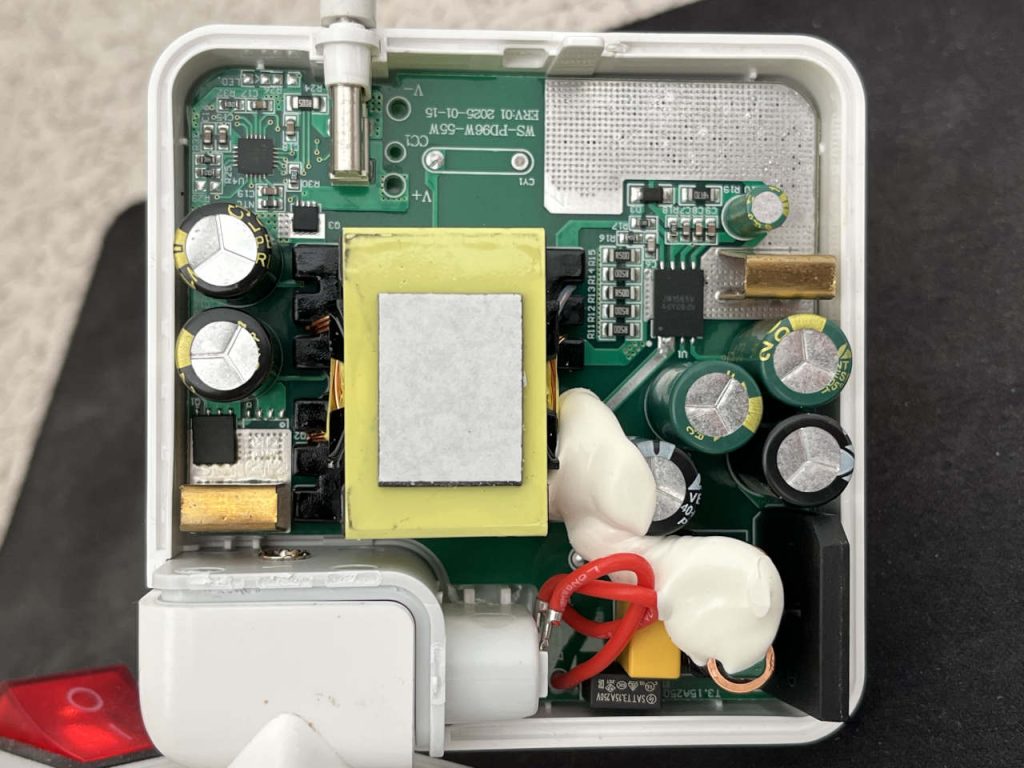
Opening an unbranded adapter often reveals the reason it was cheap.
Not here.
The first impression of this board is actually positive.
The soldering is clean. Components are placed neatly. The isolation regions are clearly defined. There are substantial copper areas on the PCB, a proper transformer, multiple electrolytic capacitors, power semiconductors on both sides of the board, control electronics and a dedicated USB-C section.
It does not look improvised.
There is even an unexpected PCB marking:
WS-PD96W-55W
ERV:01 2025-01-15
That marking does not match the 87W rating on the enclosure.
My interpretation is that the manufacturer is probably using a common 55W PCB platform for several charger variants rather than designing a unique board solely for this PD-87W product. That is not necessarily a problem — shared platforms are normal in electronics manufacturing — but it helps explain why the model identity is difficult to trace.
What matters more is that the power supply actually works as a USB-C laptop charger.
It was delivering real power
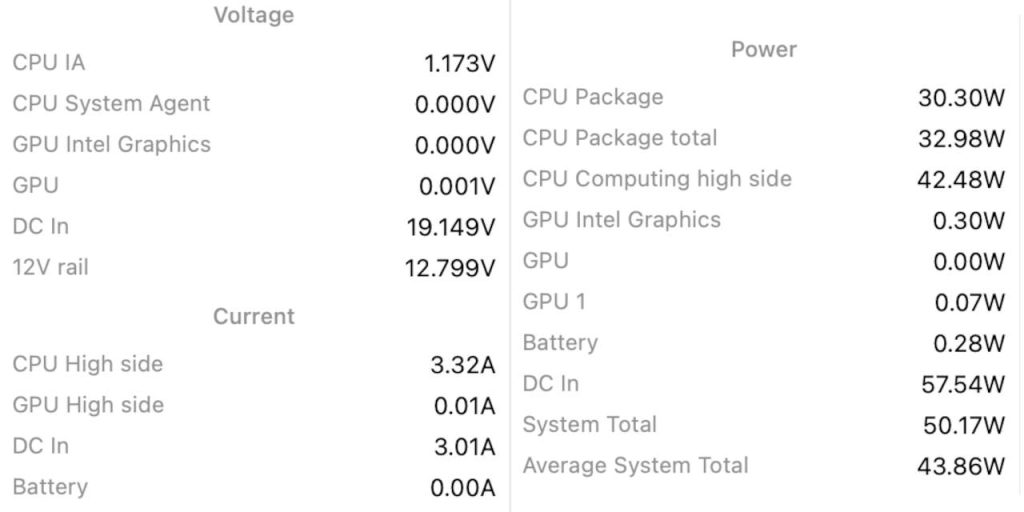
During testing, the MacBook reported:
DC input: 19.149 V
DC input current: 3.01 A
DC input power: 57.54 W
The computer itself reported total system consumption of about 50.17 W at that moment.
So this was not a test at idle.
The adapter was supplying roughly two-thirds of its advertised maximum output, and the USB-C negotiation was clearly doing its job.
That makes the thermal results much more useful.
The thermal camera tells the story
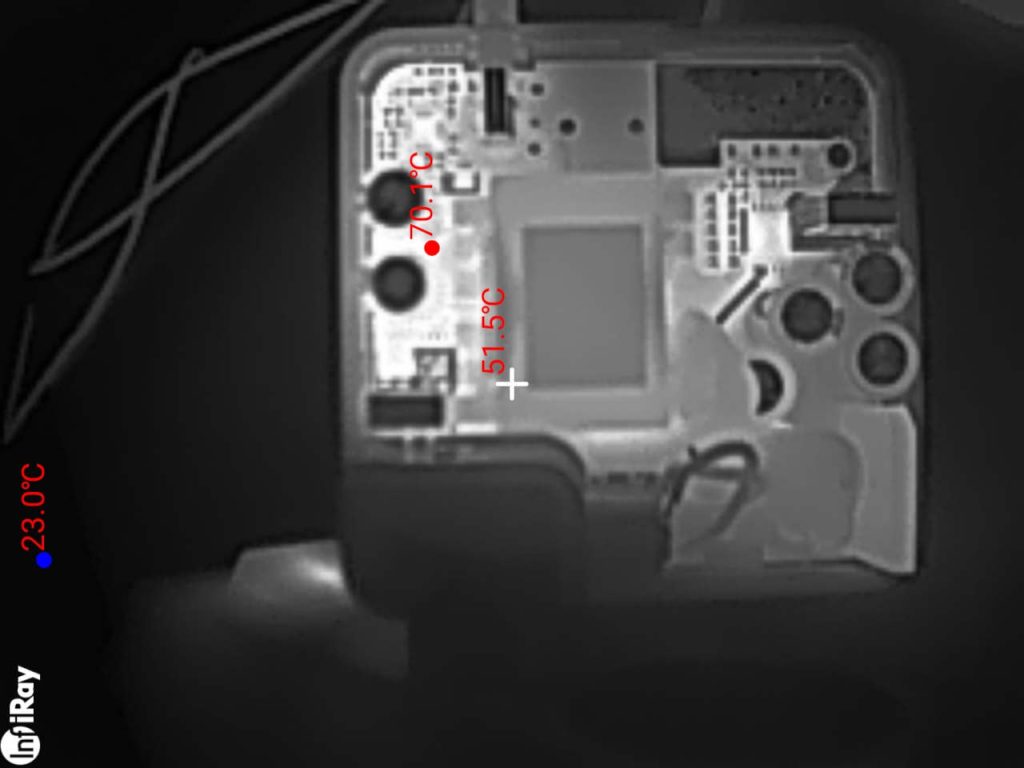
With the enclosure open and the adapter running under roughly the same load, the PCB developed several concentrated hot spots.
The highest measurement I captured was 73.6°C.
Another area reached approximately 70.9°C. Other power-stage regions measured around 67.4°C, 66.1°C, 65.9°C, 63.7°C and 62.7°C.
Meanwhile, the large central transformer was much cooler in the wider thermal views, around 46–52°C.
That distribution is important.
The transformer is not simply cooking the entire enclosure. Most of the heat is concentrated around the semiconductor power-conversion stages and the parts immediately surrounding them.
On the component side, one warm region corresponds to the switching/output section near the low-value current-sense resistors and power device. On the reverse side, large copper areas carry heat away from power semiconductors and rectification components. The secondary/output stage also places heat close to the electrolytic capacitors which will kill them soon.
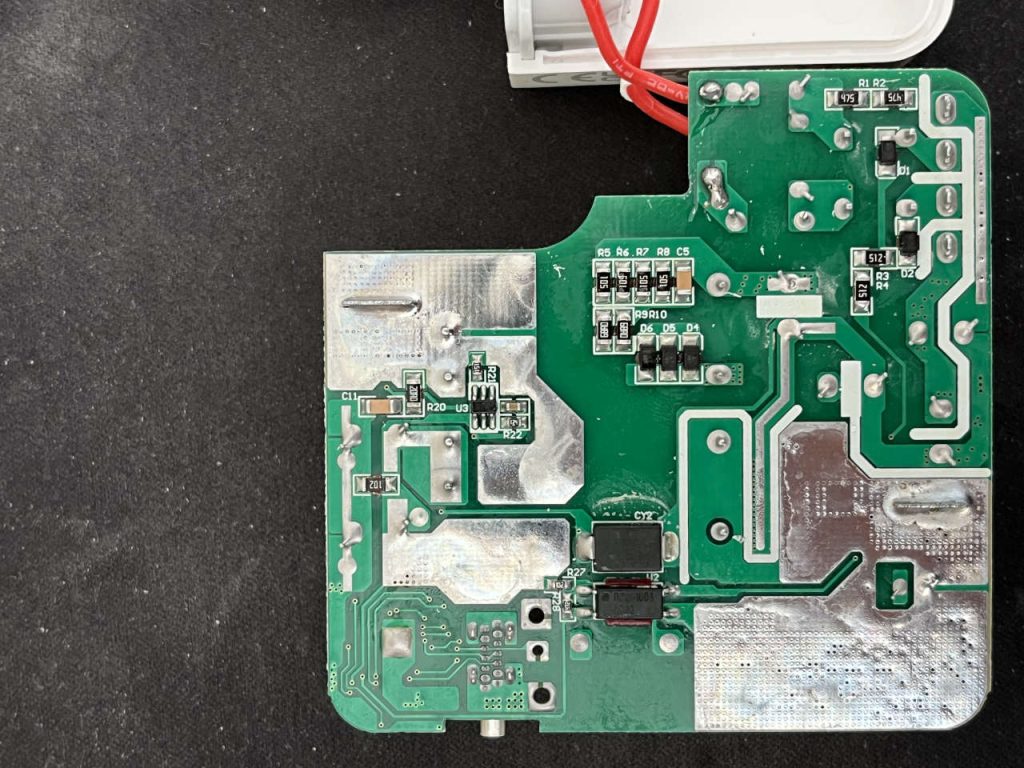
I would avoid assigning an exact junction temperature to any individual chip from these images alone. Thermal-camera readings depend on emissivity, and shiny solder or metal can give misleading surface readings.
But the overall heat pattern is unmistakable: the power silicon is generating substantial localized heat, and the board itself is being asked to spread it.
Which components are doing the work — and producing the heat
A modern 87W USB-C adapter has several places where heat is expected.
On the high-voltage side, mains power is rectified and switched at high frequency by the primary power stage. The main switching MOSFET and associated rectification circuitry therefore dissipate power every time the supply converts mains voltage into the high-frequency energy sent through the transformer.
On the low-voltage side, the secondary rectification stage converts that transformer output back into DC. At these power levels, efficient designs typically rely on low-loss power semiconductors rather than a simple old-fashioned rectifier diode.
The board also contains low-value current-sense resistors, USB-C Power Delivery control electronics and several output electrolytic capacitors that smooth the DC supplied to the computer.
The thermal images show the strongest heating in and around these power semiconductor and rectification areas, rather than in the small USB-C logic section itself.
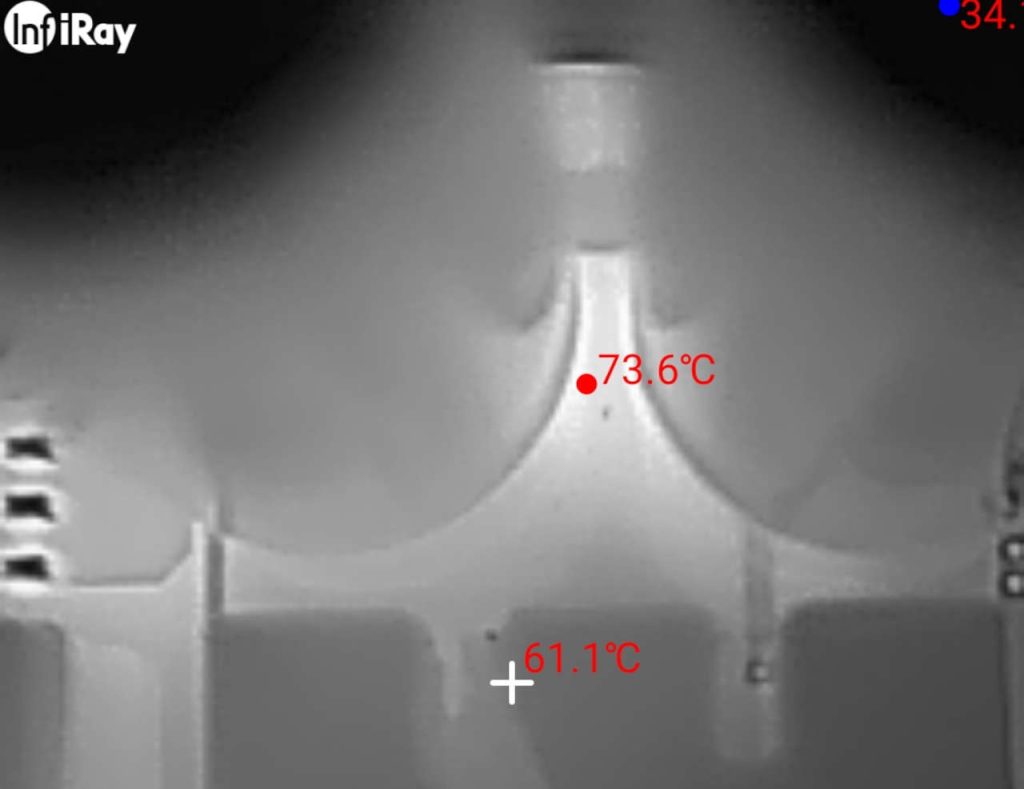
That is exactly where I would expect most conversion losses to appear.
What I did not expect was the absence of a substantial mechanism for moving that heat away from the PCB.
Compare it with Apple’s original 87W adapter
This is where the teardown becomes especially interesting.
Apple’s original 87W USB-C adapter, model A1719, was designed for 15-inch USB-C MacBook Pro models. Apple itself lists an 87W adapter for those machines.
ChargerLAB opened a genuine A1719 and documented something my no-name adapter conspicuously lacks: a large copper heat-spreading structure surrounding the internal electronics, thermally conductive adhesive on both sides, and insulating material between the PCB and heat-spreading assembly.
ChargerLAB — Apple 87W A1719 teardown
That is not decorative metal.
Its job is to take concentrated heat from switching components and spread it over a much larger area of the enclosure.
My PD-87W does have generous copper on the PCB and several areas of silicone-like adhesive around larger components. Those are useful.
What I do not see is anything comparable to the substantial copper heat-spreader arrangement inside the genuine Apple supply.
That is the biggest difference between the two designs.
Why the open-case temperature matters
A semiconductor running at 70°C is not automatically in trouble.
Many MOSFETs and controller ICs are specified for junction temperatures far above that.
So a thermal image showing 70°C does not prove that this adapter is about to fail.
The more interesting question is thermal margin.
These measurements were taken with the plastic enclosure open, where heat could escape directly into the room.
Close the case and convection changes completely.
A well-designed enclosed power adapter anticipates this by conducting heat away from small high-loss components into larger copper or metal surfaces. That lowers local thermal stress and spreads the heat through the housing.
Here, much of that job appears to have been left to the PCB copper itself.
That is adequate enough for the adapter to work.
Whether it is enough for years of repeated high-load charging is a different question.
Heat matters to more than the MOSFETs
The power transistors are usually capable of surviving considerable heat.
The surrounding components can be less forgiving.
Electrolytic capacitors are particularly sensitive to sustained temperature. Their lifetime generally falls as operating temperature rises, which is why good power-supply design tries not to park them beside an unnecessary hot spot.
Repeated heating and cooling also stresses solder joints, adhesives and PCB materials.
That does not mean this adapter will necessarily fail quickly.
It does help explain why thermal engineering matters even when every individual semiconductor remains below its absolute maximum rating.
And it provides a plausible direction to investigate when a charger already exhibits intermittent behaviour under normal use.
I cannot prove from the thermal images alone that heat caused the dropouts I experienced. USB-C negotiation, the cable, connectors or another intermittent electrical fault could also produce the same symptom.
But the heat distribution certainly gives me one more reason not to treat the adapter as equivalent to a properly engineered original.
The strange thing is that most of the design is quite good
This is what makes the PD-87W interesting enough to write about.
If the PCB had been terrible, there would be no mystery.
Instead, somebody clearly put real engineering into it.
The component layout is compact. The soldering quality is good. There is a substantial transformer. The adapter supports multiple USB-C voltage levels. The power stage successfully delivered more than 57 watts to the computer during my test.
This is not electronic garbage.
It looks more like a product that was engineered to hit a price point by spending money where it was essential — the conversion circuitry — and saving money on something less visible to the buyer: thermal hardware.
That is a much more useful lesson than simply saying “cheap chargers are bad.”
Some cheap chargers are electrically crude.
This one isn’t.
Its compromise is subtler.
What I found about reviews
I searched specifically for the PD-87W model rather than lumping every white 87W MacBook replacement adapter together.
The result was surprisingly thin.
The same PD-87W designation appears in OEM and retail listings, but I found no substantial body of independent customer reviews that I could confidently tie to the exact board and enclosure tested here. The Garmade PD-87W page explicitly shows no reviews.
Walmart also currently carries various third-party 87W MacBook-compatible adapters. One current 87W listing has no ratings yet, which illustrates how difficult it can be to judge this category from marketplace listings alone.
Walmart — third-party 87W MacBook adapter
For context, the genuine Apple 87W USB-C adapter has a much deeper review history. eBay’s product-review page for the Apple MNF82LL/A 87W USB-C adapter currently shows a 4.7/5 rating from 80 product ratings, with 57 written reviews.
Apple 87W USB-C Power Adapter customer reviews
That does not mean every third-party adapter should be avoided. It means the anonymous marketplace category gives you much less evidence about exactly what is inside the case.
Verdict
The no-name PD-87W charger that came with my used MacBook Pro surprised me.
I expected a crude copy.
Instead, I found a reasonably sophisticated switch-mode power supply with clean assembly, a proper USB-C power architecture and enough real output to feed the MacBook more than 57 watts during testing.
The electrical design deserves more credit than the anonymous housing suggests.
The thermal design is where I would have spent more money.
At a load well below the claimed 87W maximum, several regions were already in the mid-to-high 60s Celsius and the hottest measurement reached 73.6°C with the case open. Unlike Apple’s original 87W design, I found no substantial copper heat-spreader system to distribute that heat through the enclosure.
That does not prove the charger is unsafe, nor does it prove that temperature caused the intermittent disconnects that led me to open it.
It does explain why two chargers carrying the same wattage number can be very different products.
The interesting lesson from this teardown is not that an inexpensive charger cannot contain decent electronics.
This one does.
It is that good circuitry is only half of a power-supply design. Getting the heat out is engineering too.