
I originally bought the InfiRay P2 Pro because a thermal camera looked useful.
It turned out to be one of those tools where you keep finding new jobs for it.
I have used mine while building a house to look for places where heat was escaping. I have used it on faulty electronics, where one warm component among dozens can point you toward a problem in seconds. I have taken it hunting, where an animal that disappears visually into vegetation can still stand out by its body heat. And sometimes I simply use it as a convenient non-contact temperature measuring tool.
The interesting part is that the whole camera is scarcely larger than the end of your thumb.
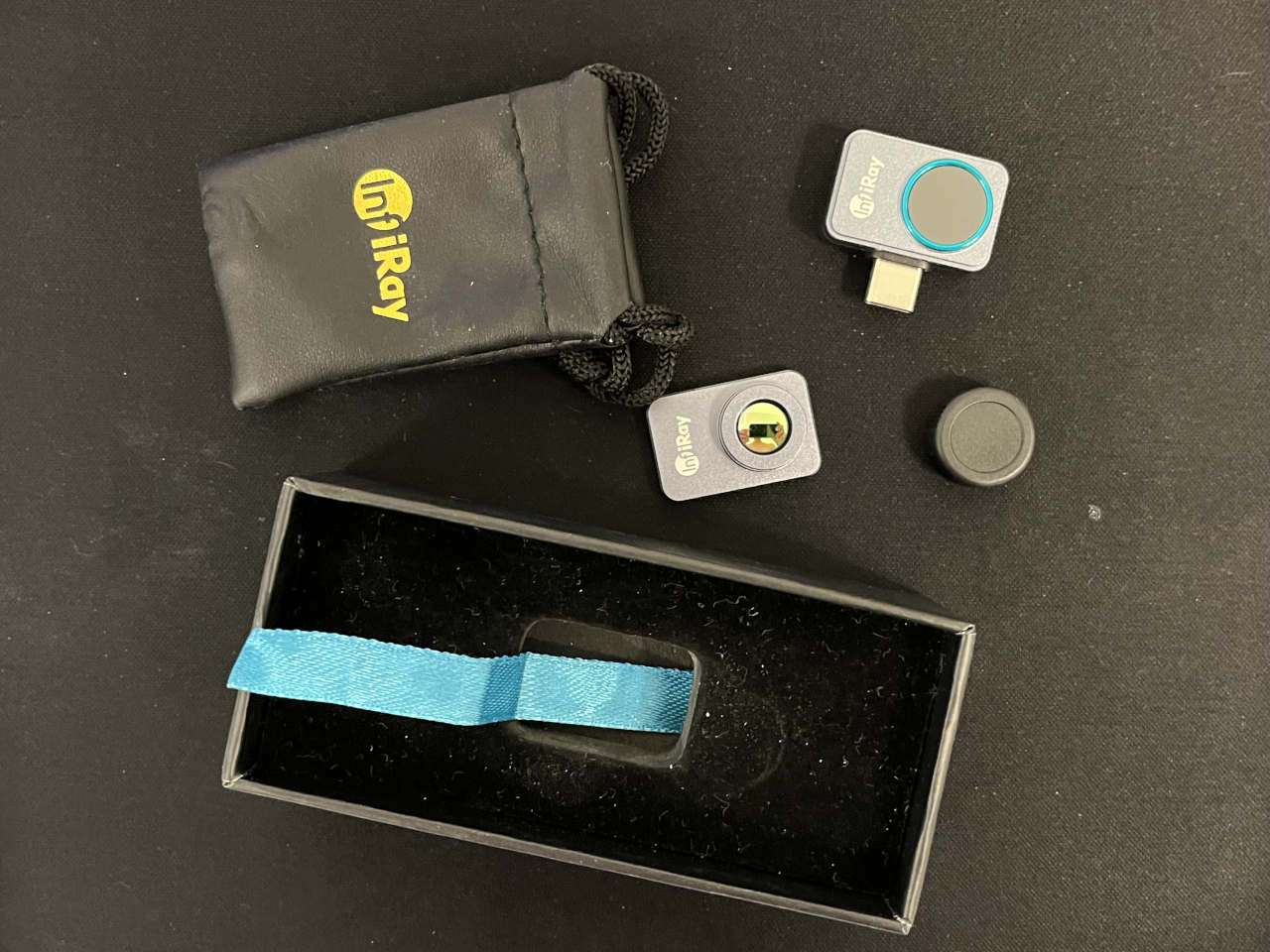
The InfiRay P2 Pro plugs into a phone and turns it into a surprisingly capable thermal imager. It weighs only 9 grams, needs no separate battery and, with its magnetic macro lens attached, can get close enough to a circuit board to make individual electronic components meaningful rather than showing you one indistinct warm patch.
After using it in very different situations, that versatility is what impresses me most.
A real thermal camera in something this small
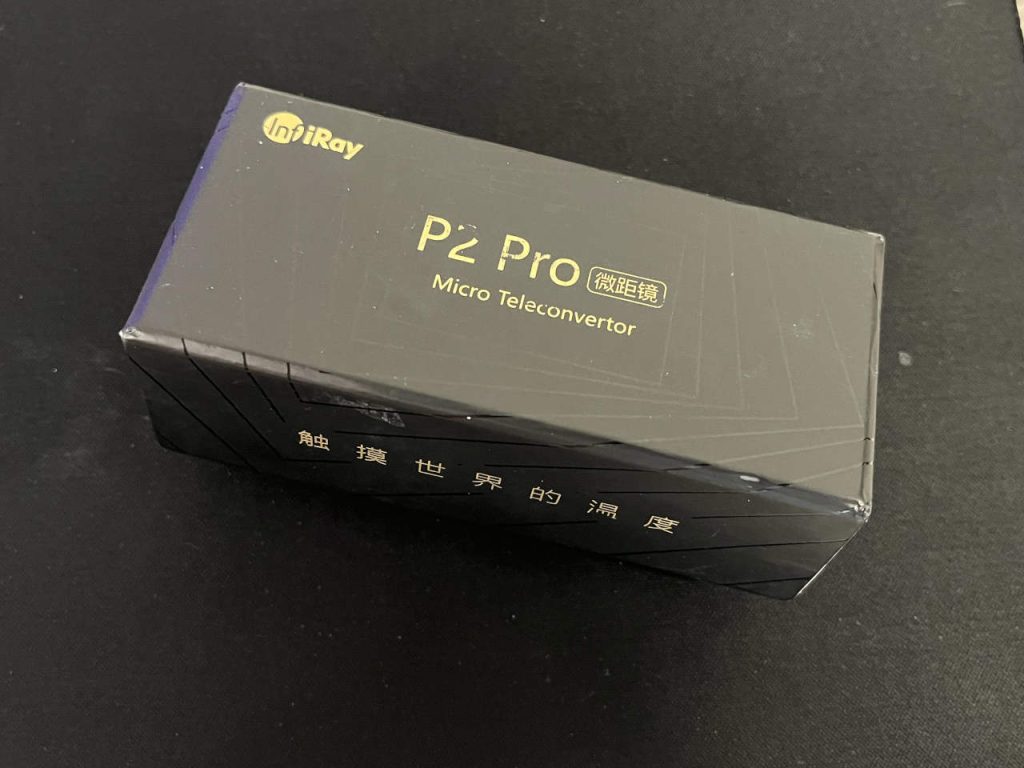
The specifications explain why the P2 Pro feels considerably more useful than its dimensions suggest.
Its infrared detector has a native resolution of 256 × 192 pixels, giving 49,152 individual thermal measurement points.
The quoted specifications are:
- Thermal resolution: 256 × 192
- Frame rate: 25 Hz
- Temperature range: –20°C to 550°C
- Accuracy: ±2°C or ±2%, whichever is greater
- Field of view: 56° × 42.2°
- Weight: 9 g
- Dimensions: approximately 27 × 18 × 9.8 mm
- Connection: USB-C or Lightning depending on version
Those figures matter in actual use.
A 25 Hz image is fluid enough that you can move the camera around naturally and watch heat spread in real time. That is very different from some thermal cameras whose slow refresh makes the image feel like a sequence of still photographs.
The 256 × 192 detector is also detailed enough to distinguish useful shapes rather than simply telling you that one half of something is warmer than the other.
Digital Camera World reached much the same conclusion in its hands-on test, praising the P2 Pro’s portability, 25 Hz refresh rate and macro capability.
Digital Camera World P2 Pro review
Hackaday went further and tested the camera specifically for electronics work, where the combination of resolution and the magnetic macro lens proved particularly useful.
Finding heat loss in a house
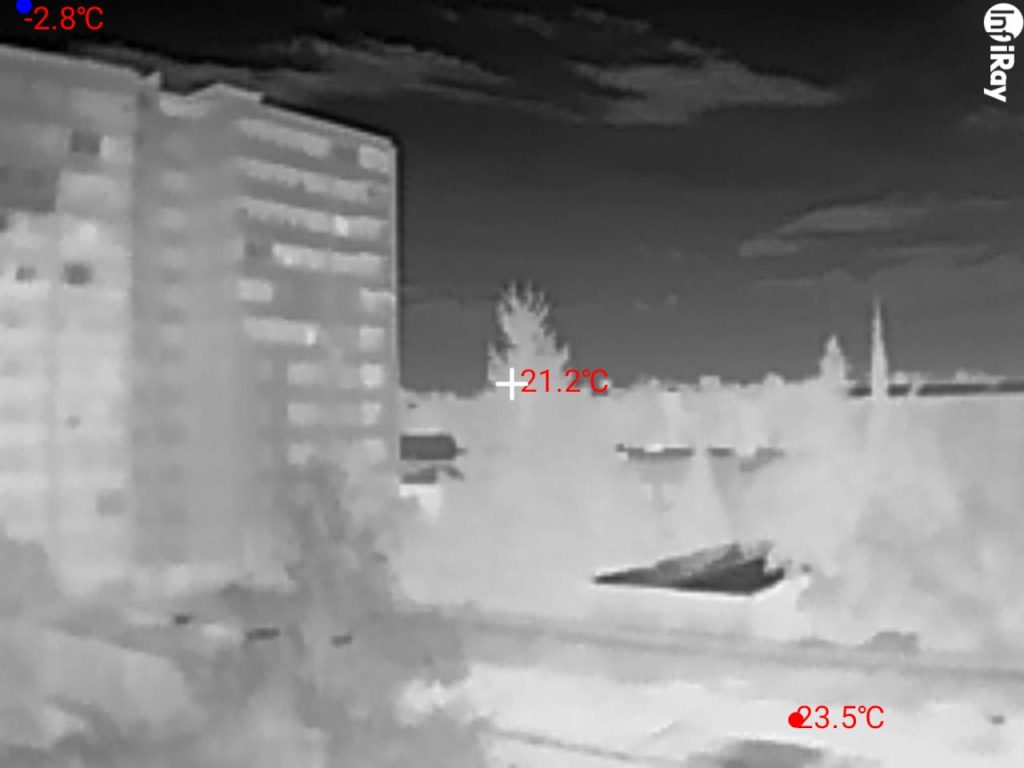
One of my first practical uses for the P2 Pro was during house construction.
A normal photograph can tell you whether a wall looks properly finished. A thermal image can tell you something completely different.
You can scan walls, windows, doors, roof joints and insulation and immediately see temperature differences that are invisible to the eye.
A colder line around a window can reveal an air leak. A warmer or colder patch in a wall can suggest missing or uneven insulation. Thermal bridges around structural elements become much easier to spot.
That does not automatically tell you why the temperature is different, but it tells you where to investigate.
For this kind of work the P2 Pro’s wide field of view is useful. You can stand back and look at a significant part of the wall rather than inspecting it centimetre by centimetre.
It is also much easier to carry around a building site than a full-size thermal camera. The camera itself disappears into its small pouch; your phone provides the screen, storage and processing.
For someone building, renovating or maintaining a house, I can imagine buying the P2 Pro for this job alone.
Electronics is where the macro lens becomes special
For me, the most interesting use is electronics repair.
Electronics technicians have always used temperature as a diagnostic clue. Long before affordable thermal cameras existed, you touched components carefully, used freeze spray, alcohol evaporation, thermocouples or an infrared thermometer.
A thermal camera changes the process because you can inspect the whole board at once.
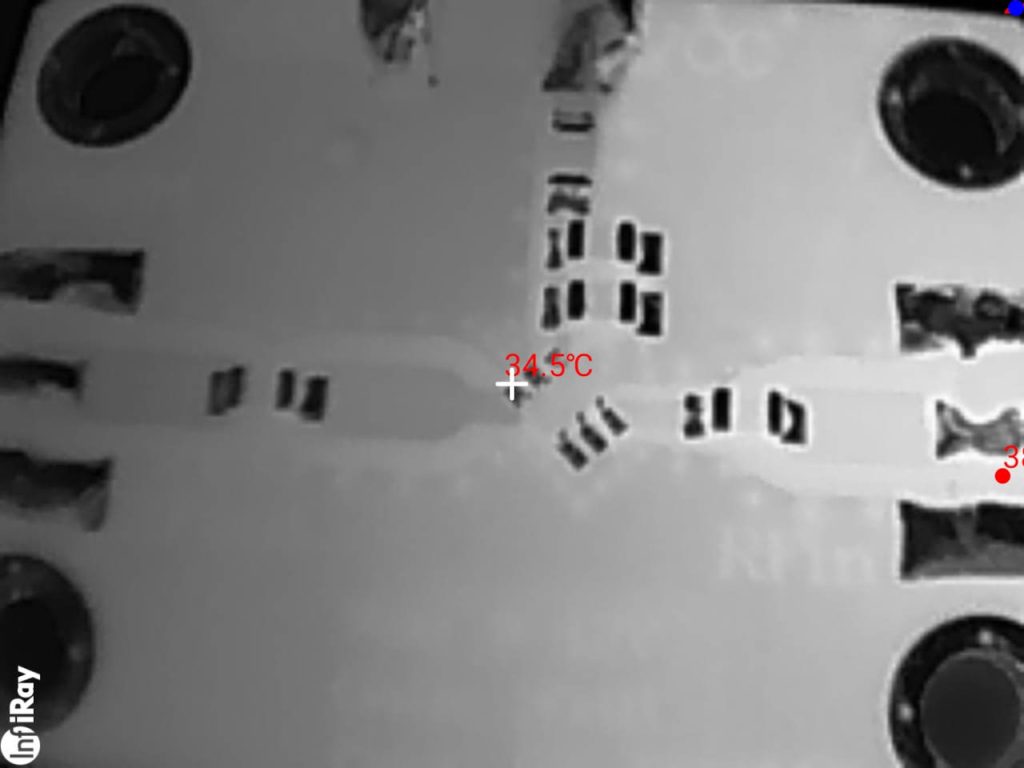
Attach the magnetic macro lens to the P2 Pro and small surface-mount components become visible as separate thermal objects.
That can save an enormous amount of time.
What gets hot on a circuit board?
Some electronic components are expected to run warm. Others should immediately get your attention.
Power MOSFETs are among the obvious heat producers. In switching power supplies, motor controllers, laptop power rails and battery circuits, they can carry substantial current. One MOSFET running noticeably hotter than an identical device beside it can be an important clue.
Linear voltage regulators deliberately turn unwanted voltage into heat. Finding a warm regulator may therefore be completely normal, but an abnormally hot one can reveal excessive downstream current.
Switching regulator ICs and their surrounding power stages generate heat too. A thermal image makes it easy to see which converter is active and whether one section is working much harder than the others.
Rectifier and Schottky diodes can become quite warm in power supplies and DC converters. In modern synchronous designs, MOSFET rectifiers produce similar identifiable hot spots.
Power resistors and current-sense resistors are designed to dissipate energy. Their temperatures can tell you a great deal about how heavily a circuit is loaded.
Inductors in DC-DC converters can heat through winding resistance and core losses. A very warm inductor beside a cool equivalent circuit deserves investigation.
Processors, GPUs and power-management ICs create distinctive heat patterns that can show whether a circuit is starting at all.
And then there are components that should not normally be hot.
A shorted multilayer ceramic capacitor, for example, may be extremely difficult to identify visually on a crowded board. Inject a controlled low voltage into the affected rail and the defective capacitor can sometimes reveal itself as one tiny hot spot.
A resistive connector, damaged solder joint or overloaded PCB trace can also show up thermally.
That is where the P2 Pro stops being an interesting gadget and becomes a diagnostic instrument.
In one of my own PCB tests, the macro view clearly separated the surface-mount components and allowed temperatures to be placed directly over the area being examined.
The macro lens is not an accessory I would skip
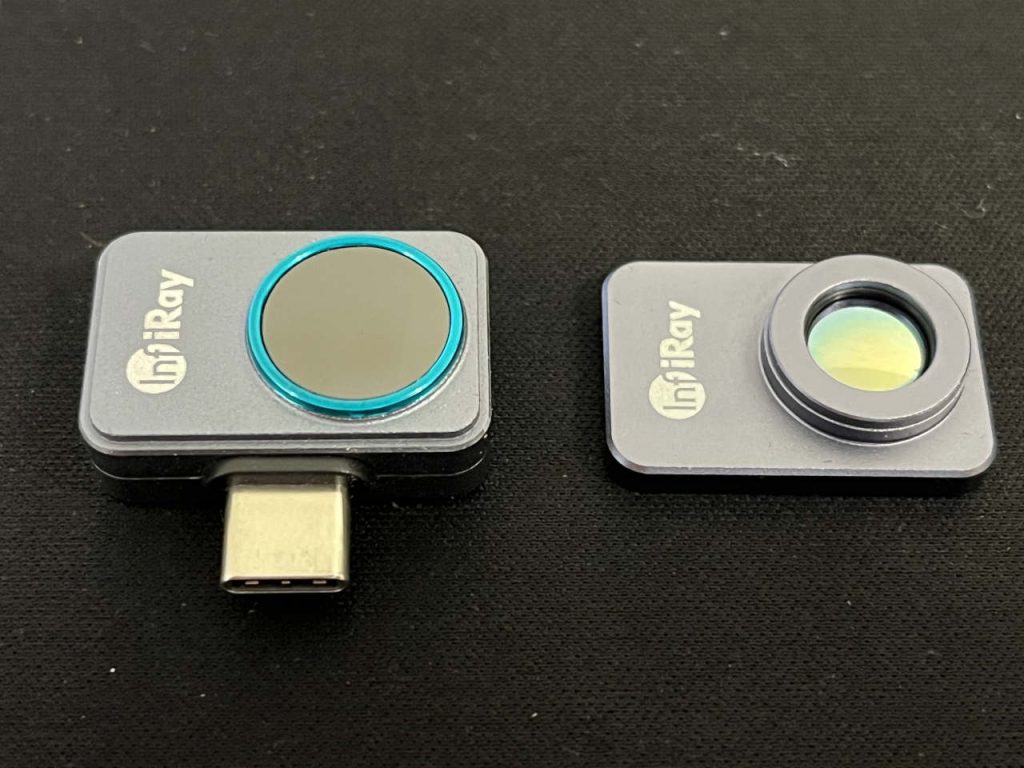
The P2 Pro can be bought in configurations with a magnetic close-up lens.
For electronics, get it.
Without the macro lens, the camera is ideal for rooms, electrical panels, appliances, engines and larger objects. With it, the useful working scale changes dramatically.
The lens attaches magnetically to the front of the camera. In my set, the camera, macro lens, lens cap and small protective pouch occupy hardly any space.
It means I can have a thermal microscope of sorts in a toolbox without carrying another large instrument.
That is one of the P2 Pro’s biggest advantages over bulkier thermal cameras.
Measuring temperature is genuinely useful
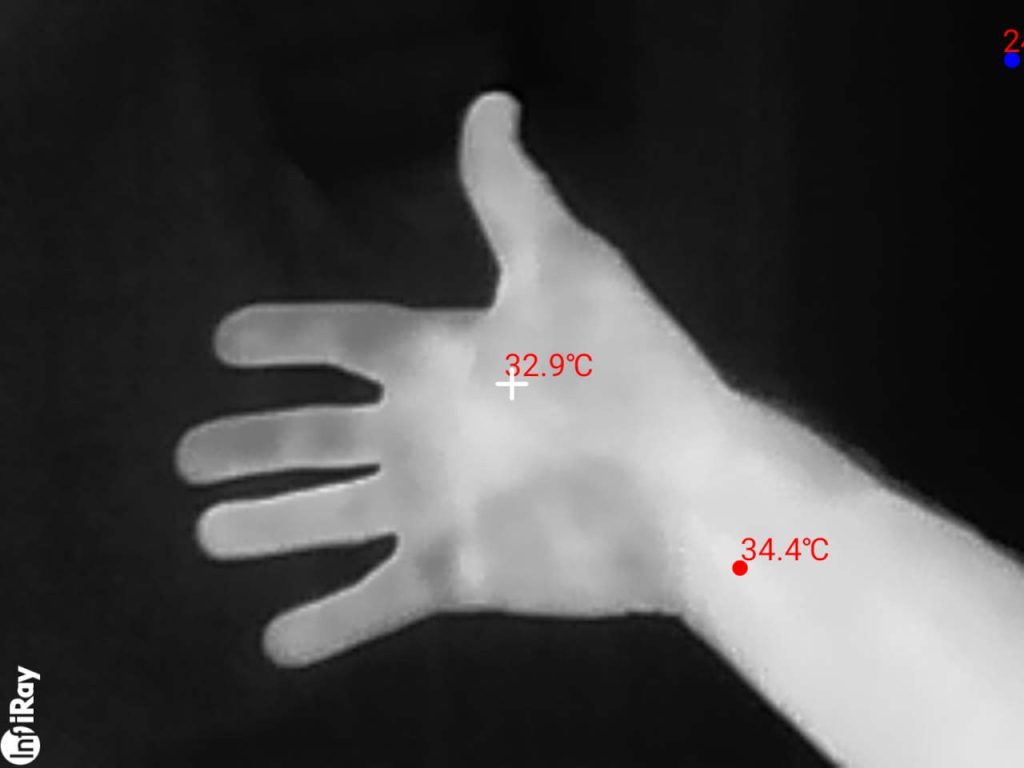
The software lets you place measurement points directly on the thermal image.
In one simple test, for example, the camera showed different temperatures across my hand and wrist, with readings around 32.9°C and 34.4°C.
That ability becomes far more useful when you move to machinery, electronics, heating systems or building surfaces.
You can measure a point, line or area and look for minimum and maximum temperatures rather than simply judging colours.
There is one important rule with any thermal camera: it measures infrared radiation from a surface, not temperature by physical contact.
The surface’s emissivity matters.
Painted walls, skin, plastics and most non-shiny surfaces are relatively easy. Polished metal can reflect infrared radiation from the surrounding room and give a misleading reading.
If you need a reliable measurement from a shiny metal component, putting a small piece of matte electrical tape on it and measuring the tape after it reaches the same temperature is often more meaningful than pointing the camera directly at reflective metal.
Within those limits, I have found the P2 Pro very convincing as a practical temperature tool.
The manufacturer’s specified accuracy is ±2°C or ±2%. A 2026 independent test by CKTechCheck compared a P2 Pro with contact measurements and reported deviations of less than half a degree Fahrenheit at its tested reference points.
CKTechCheck P2 Pro accuracy test
It can see living things surprisingly well
Thermal imaging is also useful outdoors because warm-blooded animals can stand out strongly against cooler vegetation and ground.
I have used the P2 Pro while hunting, and it has helped me locate game that was difficult to distinguish visually.
It is not meant to replace a dedicated long-range thermal monocular. The lens is wide, which is exactly what you want for buildings and general inspection.
But as something that lives in a pocket and connects to a phone in seconds, it can be surprisingly useful for scanning the nearby surroundings.
A thermal camera also works without visible illumination. Darkness that makes an ordinary camera nearly useless does not remove the temperature difference between a warm animal and its environment.
As always, the permitted use of thermal equipment while hunting varies by jurisdiction, so local rules matter.
People look completely different in infrared
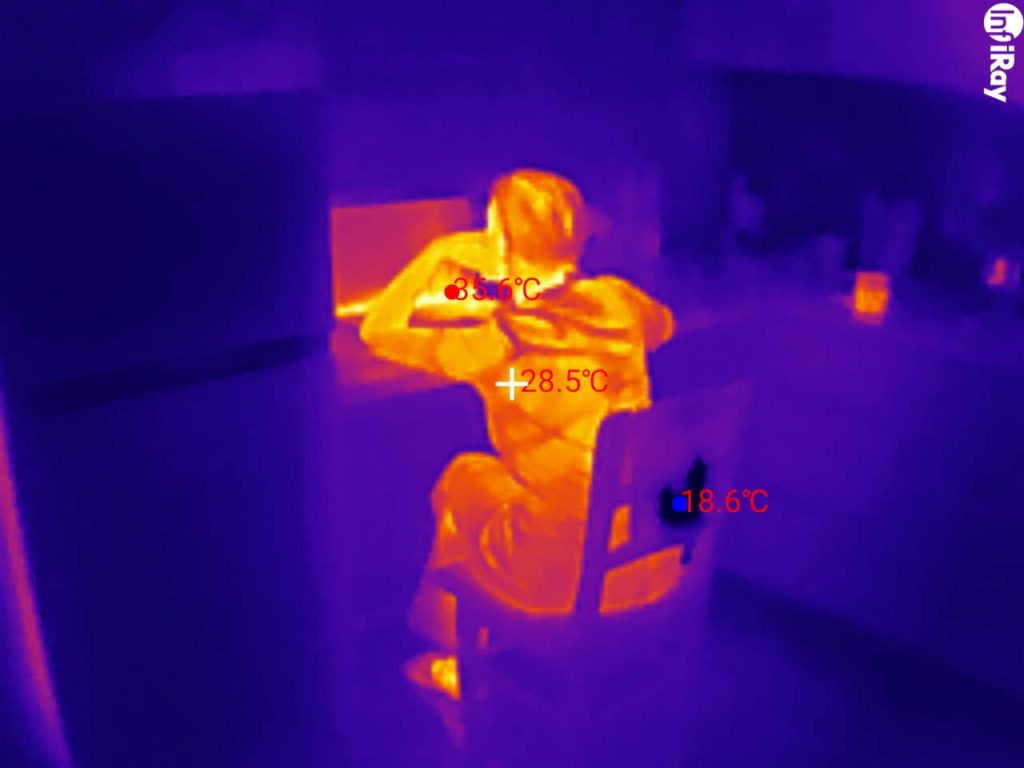
Point it at a person and you immediately understand why thermal imaging is so fascinating.
Skin, clothing, hair and the surrounding room form completely different shapes from those in a normal photograph because the image represents emitted thermal radiation rather than visible light.
In one of my images, exposed skin around the neck registered about 35.6°C, clothing was lower, and the surrounding background was much cooler.
The P2 Pro is not a medical thermometer, and I would not use it to diagnose fever.
But as a demonstration of temperature distribution — or for finding hot and cold regions on objects — it works extremely well.
No battery is a feature
The P2 Pro has no internal battery.
It draws a small amount of power directly from the connected phone.
I consider that an advantage.
There is nothing else to charge before you use it, no lithium battery quietly ageing in a drawer, and no situation where you need the thermal camera only to discover that its battery has gone flat.
Notebookcheck measured power consumption around 314–320 mW in its testing, close to and actually below the manufacturer’s 350 mW figure.
For occasional diagnostic use, that is an excellent arrangement.
What real owners say
Owner feedback from other retailers largely matches my experience with the camera.
On Pergear, P2 Pro buyers repeatedly mention its small size, easy setup and usefulness for practical jobs. One owner describes it as compact and robust, with resolution and sensitivity that are more than adequate for their needs. Another specifically mentions using it to investigate how well a house is insulated. Other buyers report successful use with Samsung and newer iPhones.
Read P2 Pro customer reviews on Pergear
Independent reviewers have reached similar conclusions. Digital Camera World praised the P2 Pro’s portability, smooth 25 Hz imaging and magnetic macro option, while Android Central highlighted its tiny metal body, usable image quality and ability to record thermal video at 25 fps.
Digital Camera World P2 Pro review
P2 Pro vs FLIR ONE Pro and TOPDON TC001
The P2 Pro is not alone in this market, but its combination of size and specifications remains unusual.
| InfiRay P2 Pro | FLIR ONE Pro | TOPDON TC001 | |
|---|---|---|---|
| Native thermal resolution | 256 × 192 | 160 × 120 | 256 × 192 |
| Refresh rate | 25 Hz | 8.7 Hz | 25 Hz |
| Maximum specified temperature | 550°C | 400°C | 550°C |
| Weight | 9 g | — | 30 g |
| Macro lens | Available | No comparable magnetic macro lens | No equivalent included macro lens |
| Own battery | No | Yes | No |
FLIR has an important strength of its own: its visible-light camera and MSX processing can overlay structural details onto the thermal image, which makes some scenes easier to interpret.
The TOPDON TC001 is technically much closer to the P2 Pro, with the same 256 × 192 resolution, 25 Hz frame rate and –20°C to 550°C measurement range.
But the P2 Pro weighs only 9 grams versus 30 grams for the TC001, and for my kind of electronics work the magnetic macro lens is the deciding feature.
The best tool is the one you actually have with you
That may be the strongest argument for the P2 Pro.
A professional handheld thermal camera can be excellent, but it is another device to carry, charge and remember.
The P2 Pro can live in a tiny pouch.
When I need to inspect a wall, I connect it.
When a PCB is behaving strangely, I connect it and add the macro lens.
When I want to know which part of a power supply is producing most of the heat, I can see the answer rather than guess.
When I am outside in the dark, it gives me another way of seeing the scene.
And when I simply need to compare the temperature of two objects, it does that as well.
Verdict
The InfiRay P2 Pro is one of the smallest tools I own, but it has found its way into more jobs than many much larger instruments.
For building work, it makes insulation problems and temperature differences visible.
For electronics, the macro lens turns heat into a diagnostic signal. MOSFETs, regulators, rectifiers, resistors, inductors and failing components can suddenly point to themselves.
Outdoors, it reveals warm objects that disappear in visible light.
And as a general temperature instrument, it gives you a complete thermal picture instead of one number from an infrared thermometer.
The P2 Pro’s 256 × 192 sensor, 25 Hz video, 550°C upper measurement range and 9-gram body are impressive specifications. What makes me recommend it, though, is simpler:
I keep finding reasons to use it.
That is usually the best sign that a tool was worth buying.