
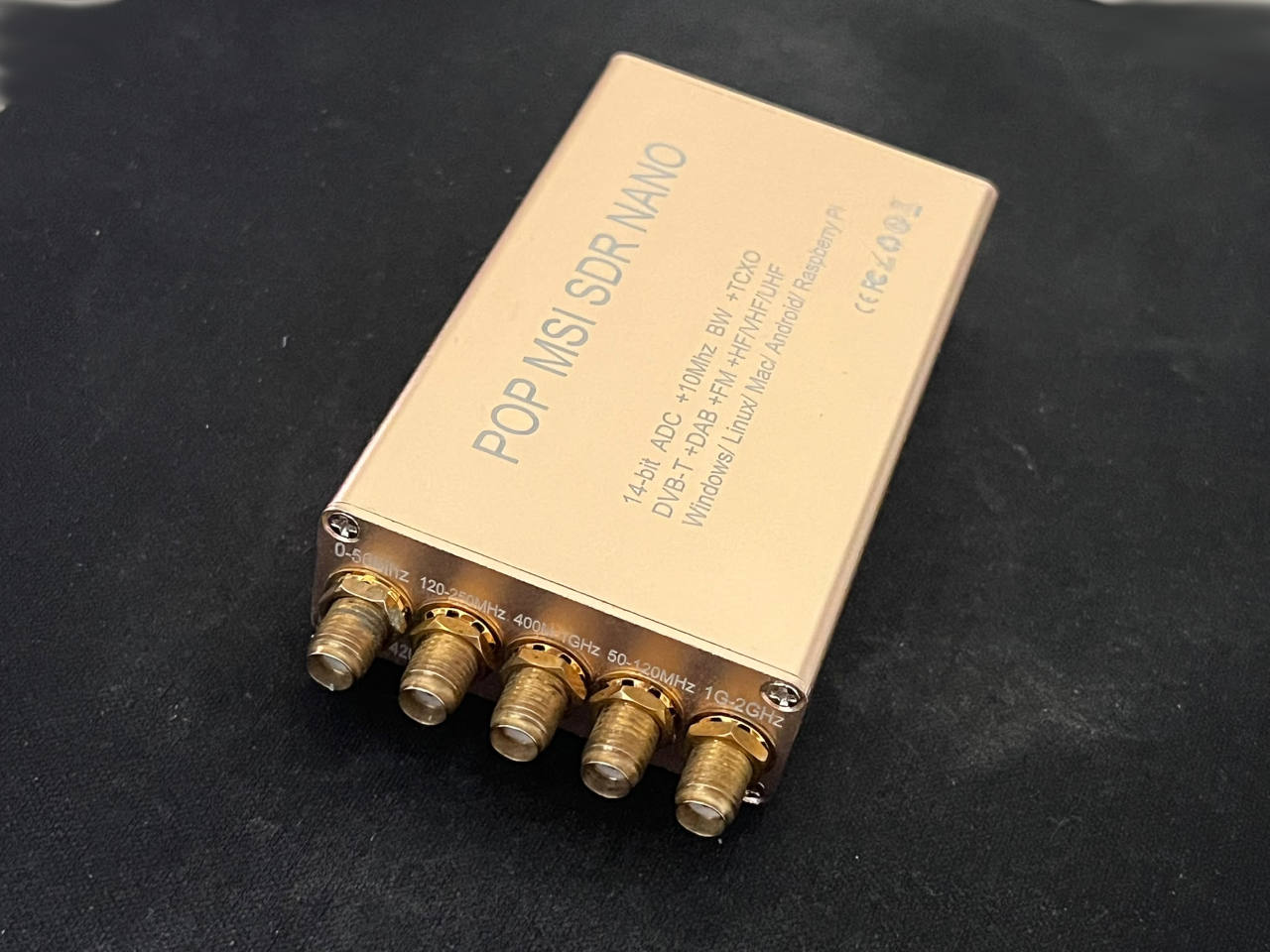
It covers 10 kHz to 2 GHz for very little money. Here’s what you get, what you don’t, and what I did to mine with a soldering iron.
Software-defined radio is cheap now. A computer, an antenna and a small USB receiver are enough to listen to amateur radio, aircraft, shortwave broadcasts and a good slice of the spectrum around you.
The MSI.SDR NANO is one of the odder budget options. It’s built on the Mirics MSI001 and MSI2500 chips and promises a huge frequency range, a 14-bit ADC (most cheap RTL-SDR dongles are 8-bit) and five separate antenna inputs. On paper that’s a lot of radio for the money.
On paper is the catch. Good chips don’t guarantee a good receiver, and this is a case where that matters.
A quick note on availability
The exact unit I reviewed is no longer manufactured. If you want to try the same chipset, a close alternative is still on sale: the MSI001 MSI2500 10 kHz–2 GHz SDR Receiver with 0.5 ppm stability. Here’s the listing.
I haven’t tested that version, so everything below about performance applies to my older unit. The “0.5 ppm” refers to the accuracy of the reference clock, which affects how far the receiver drifts off frequency. It should help with narrowband signals, but I can’t confirm the figure, and I can’t say whether the rest of the board matches my unit. Treat it as the nearest equivalent, not an identical twin.
What it is
The NANO is a small, USB-powered, receive-only SDR. Two chips do the work:
- MSI001, the RF tuner that picks out and converts the signal you want.
- MSI2500, which handles USB and analog-to-digital conversion and sends samples to your computer.
You’ll often see these boards called “SDRplay RSP1 clones” because early SDRplay hardware used the same Mirics chips. That’s only half true. Sharing chips doesn’t mean sharing input filters, PCB layout, shielding or build quality, and it certainly doesn’t mean sharing SDRplay’s software support. I’d call it an inexpensive experimental receiver, not a budget SDRplay.
Specs
| Feature | MSI.SDR NANO |
|---|---|
| Type | Software-defined radio, receive-only |
| RF tuner | Mirics MSI001 |
| USB/ADC chip | Mirics MSI2500 |
| Advertised coverage | About 10 kHz–2 GHz |
| ADC | Advertised as 14-bit |
| Antenna inputs | Five SMA |
| Connection | USB-C (on my unit) |
| Power | USB |
| Transmit | None |
Coverage and ADC figures come from the seller. They are not measurements of sensitivity, dynamic range or effective resolution.
Five antenna inputs
Most budget dongles have one antenna connector. This one has five SMA sockets, each marked for a frequency range:
| Input | Marked range |
|---|---|
| 1 | 0–50 MHz (also marked 250–420 MHz) |
| 2 | 120–250 MHz |
| 3 | 400–1000 MHz |
| 4 | 50–120 MHz |
| 5 | 1–2 GHz |
The idea is that you match an antenna to each band. It’s handy, but you have to pay attention. An HF antenna plugged into the UHF socket won’t do you any good. Also, five sockets doesn’t mean five signals at once. It’s still a single receiver.
Inside the box
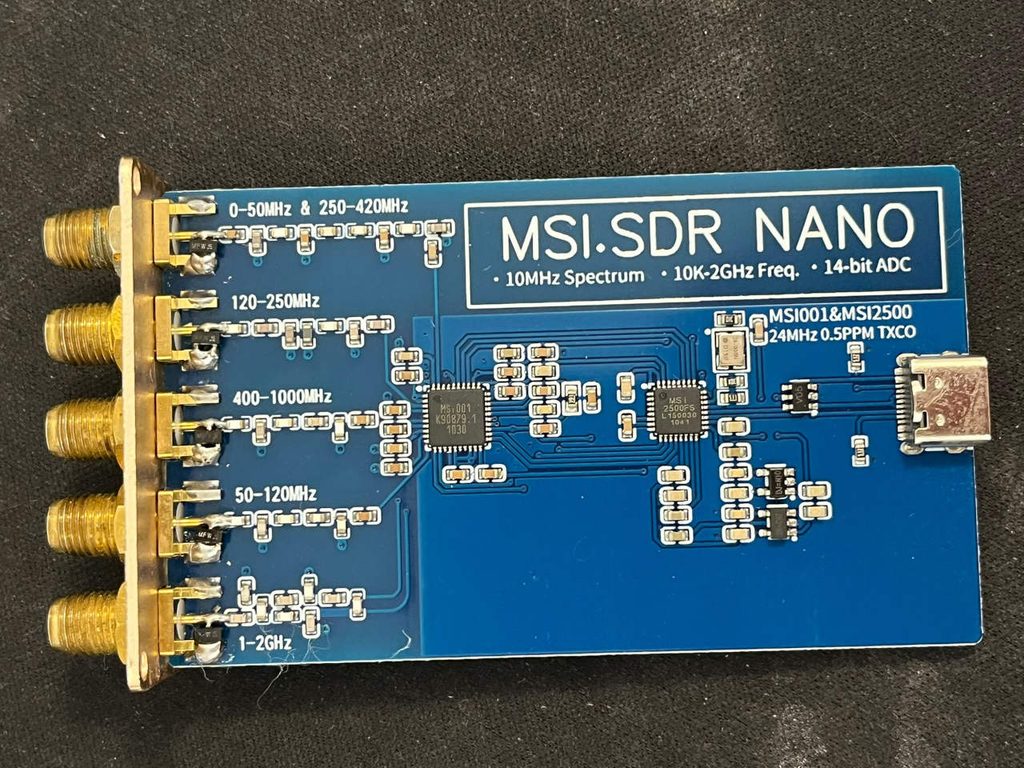
Open the aluminum case and you’ll find a very small board: the two Mirics chips, some input filtering, a few supporting parts and the USB connector. The MSI001 packs in a lot of circuitry that would otherwise need many discrete components, which is how a receiver like this can be so cheap.
What surrounds the chips matters just as much. A real antenna brings in strong FM broadcasts, cell towers and general electrical noise along with the signal you’re after. Without decent filtering and dynamic range, that junk can overload the receiver or show up as phantom signals in your display. It’s a big reason two receivers on similar chips can behave very differently.
What to expect on air
HF and shortwave. Coverage below 1 MHz is a real attraction. Many cheap SDRs need direct-sampling tricks or an upconverter to hear HF at all. Still, weak shortwave signals depend on your antenna, your local noise and the receiver’s linearity as much as the tuner.
VHF and UHF. The range takes in amateur bands, airband and various unencrypted services. What you hear will depend on where you live, your antenna and local regulations.
The 14-bit question. More bits sounds better, but effective resolution depends on the operating mode, sample rate, noise and analog design. A badly filtered 14-bit receiver can lose to a well-designed 8-bit one in a crowded RF environment. Keep that in mind when comparing it with RTL-SDR dongles.
What other owners say
Reports are mixed. Some people are happy with SDR++ and SDR Console, especially at narrow bandwidths. Others describe software compatibility problems, spurious signals generated inside the receiver, and worse results at wider bandwidths. One owner who put cheap MSI.SDR boards next to genuine SDRplay units found a forest of unwanted spectral lines on the clones that the real hardware didn’t show. Others say they got better results than from cheap RTL-based dongles in some situations.
None of that is lab data, but it points to the same conclusion: quality varies from unit to unit and from seller to seller. With a budget receiver like this, that uncertainty is part of the deal.
Software
A receiver is only useful with drivers and software that work with it. Boards based on these chips have been used with SDR++, SDR Console, HDSDR, SDRangel and open-source Mirics drivers. Support still depends on your specific board, operating system and driver version.
One more caveat: SDRplay says its official software and support are for genuine SDRplay hardware, so don’t assume a clone will work with their API or that they’ll help you if it doesn’t. Before you buy, check that the exact version works with the software and OS you plan to use. If you want plug-and-play, spend more on something better supported.
My modification: ESD protection on the inputs
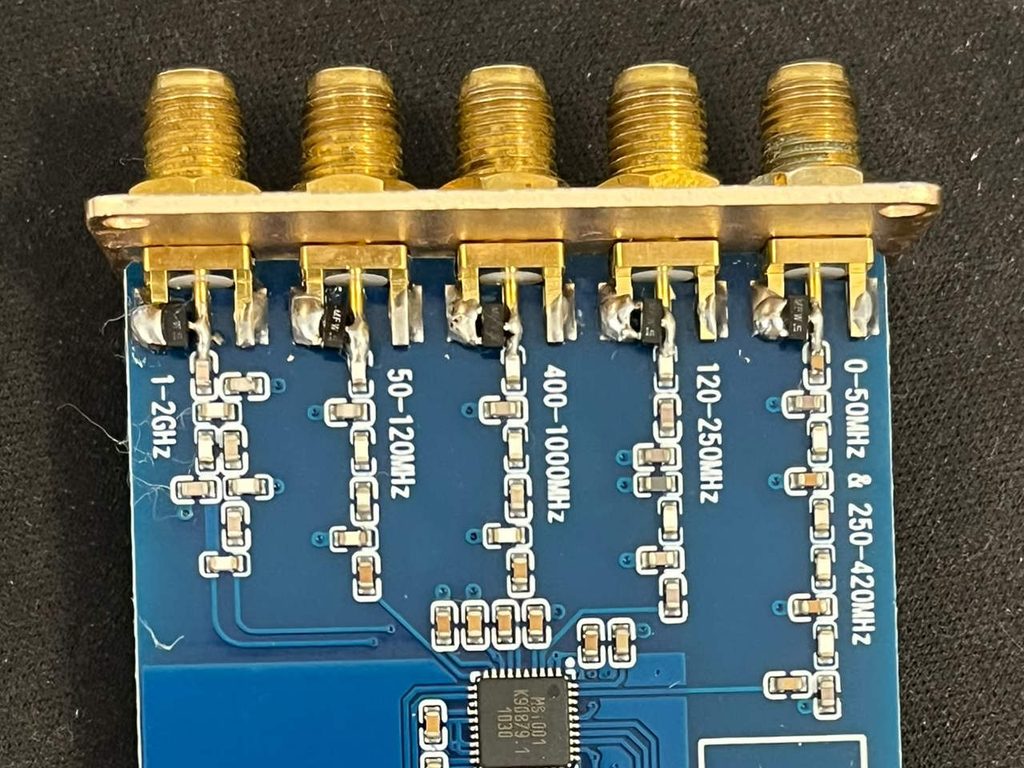
Static discharge can come in through an antenna connector, so I opened the unit and soldered a small protection diode near each of the five SMA sockets.
I used SOT-23 parts I already had. They’re marked MFW 1n, which looks like a BAV99-type dual switching diode, though I haven’t been able to confirm that. Each one has its center pin on the RF line and its outer pins to ground. If it is a dual series diode, that clamps both positive and negative spikes.
The trade-off is capacitance. Any component across an RF input adds some, which can load the input and change the impedance match at higher frequencies. The Toshiba BAV99 datasheet lists roughly 0.9 pF per diode at 1 MHz and zero bias. With two junctions on the line, that’s about 1.8 pF before counting parasitics. That’s fine at low frequencies but not negligible near 2 GHz.
This isn’t proper lightning or ESD protection either. A BAV99 is a fast switching diode, not a purpose-built RF surge suppressor with a rated ESD immunity.
Did it change anything? I tested the receiver before and after, and I didn’t notice any difference in operation or reception. That’s encouraging for such a simple mod, but I haven’t yet tried it with proper antennas across the bands, and I haven’t measured sensitivity, insertion loss, noise figure or return loss. All I can say is that it kept working normally under my test conditions. I can’t say the diodes have no RF effect.
How it compares
| MSI.SDR NANO | RTL-SDR Blog V4 | Genuine SDRplay | |
|---|---|---|---|
| Role | Low-cost experimenter’s receiver | Affordable all-rounder | Fuller wideband receiver |
| Main draw | Huge range, Mirics chips | Mature ecosystem, lots of documentation | Engineered hardware, manufacturer support |
| Software | Varies by board and driver | Well documented | Official SDRplay software |
| Inputs | Five SMA | One SMA | Depends on model |
| Main drawback | Inconsistent hardware and support | 8-bit ADC, narrower bandwidth | Higher price |
| Best for | Tinkerers | Beginners and general use | People who want consistency and support |
The RTL-SDR Blog V4 deserves a serious look for its documentation, software compatibility and community. Genuine SDRplay receivers cost more but come from a company that designs, tests and supports them. The NANO sits in between: capable silicon at a low price, with more of the problem-solving left to you.
The good and the not-so-good
What I like
- The frequency range lets you try a lot of radio services.
- Separate inputs make it easy to match antennas to bands.
- The Mirics design is a good way to learn about filtering, ADC modes and receiver performance.
- The aluminum case is compact and handy for desktop or portable use.
- The accessible board suits anyone comfortable with SMD soldering.
What I don’t
- Software support is patchy.
- Build quality is uncertain, and similar-looking boards may use different parts or input circuits.
- There are few independent measurements. Coverage and bit depth are easy to find, but sensitivity, dynamic range and spurious data are not.
- There’s no manufacturer ecosystem behind it.
Who should buy one
It makes sense if you:
- like tinkering with receivers and electronics
- don’t mind sorting out drivers and software
- want a wide frequency range without spending much
- are curious about RF input filtering and receiver design
- accept that units differ
Look elsewhere if you:
- are buying your first SDR and want an easy start
- need dependable performance for serious monitoring
- need calibrated, known RF specs
- want official support
- don’t fancy troubleshooting compatibility
Verdict
The NANO is a fun piece of cheap radio hardware. The Mirics chips, the wide range and the multiple inputs make it more interesting than the average USB dongle. But a receiver should be judged by what it picks up, how cleanly, and how well it works with your software, not by its chip list.
Mine ran fine before and after I added the clamping diodes. That’s a useful first result, not a full test. For an experimenter, it can be a good buy at the right price. For anyone who just wants a radio that works, an established RTL-SDR or a genuine SDRplay is the safer choice. If you do want to try the Mirics route, the currently available 0.5 ppm version is here.
BestQuest verdict: a rewarding receiver for the technically curious, could be a first pick for beginners.
I’ll update this review once I’ve tried it with proper antennas.